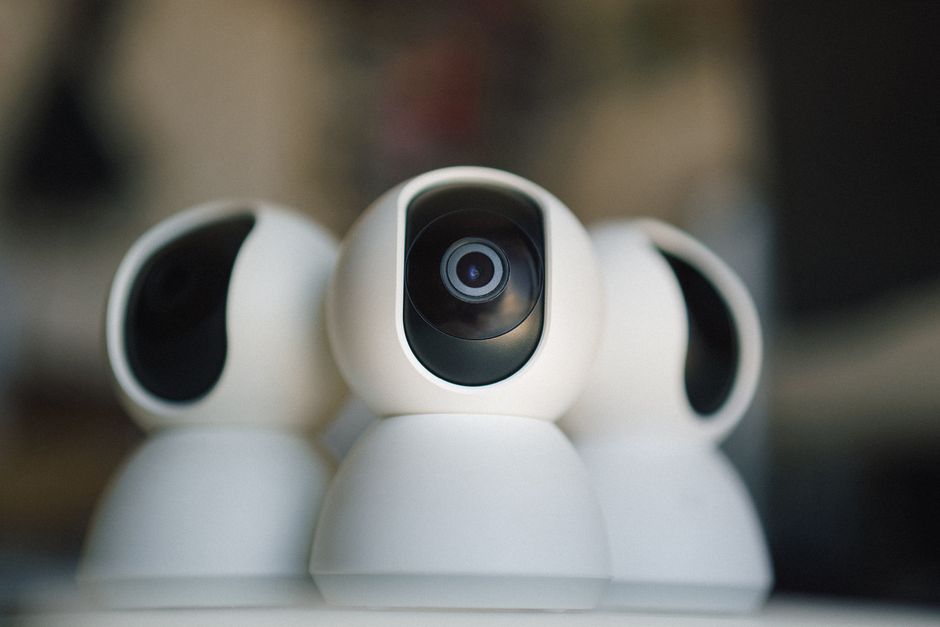
Almost every public webcam you can watch on LiveLocation, from a pier in California to a piazza in Italy, is an IP camera. The name comes from Internet Protocol, the same addressing system your phone and laptop use. Once you understand what an IP camera does inside, the rest of the camera world (PoE, Wi-Fi, 4G, solar, PTZ) is just different ways of feeding it power and a network.
What happens inside an IP camera
Think of an IP camera as four parts in a weatherproof shell:
- Lens and sensor. Light passes through the lens onto an image sensor, usually a CMOS chip. Bigger sensors and wider apertures gather more light, which matters at dawn, dusk and night.
- Image processor. The processor fixes color, exposure and noise, switches to infrared at night and applies settings like wide dynamic range for bright skies.
- Encoder. Raw video is huge, so the camera compresses it with a codec. H.264 is the universal one; H.265 (HEVC) uses roughly half the data for similar quality but is not supported everywhere.
- Network interface. An Ethernet port, Wi-Fi radio or cellular modem sends the compressed video out, along with a small web server for settings.
IP vs analog cameras
Analog CCTV cameras send an uncompressed video signal down a coaxial cable to a digital video recorder (DVR), which does the compressing. Newer “HD over coax” formats raised analog resolution a lot, and they are still a sensible upgrade path for a building already full of coax. But analog cameras cannot stream on their own: the DVR is the computer, and the cameras are just eyes.
| Feature | IP camera | Analog / HD-over-coax |
|---|---|---|
| Where video is compressed | In the camera | In the DVR |
| Cable | Ethernet (Cat5e/Cat6), Wi-Fi or 4G | Coax, plus separate power |
| Power | PoE on the same cable, or plug | Separate 12 V supply or combo cable |
| Resolution today | 2 MP to 4K (8 MP) and beyond | Up to about 8 MP on newer formats |
| Streams by itself | Yes (RTSP, often RTMP) | No, only through the recorder |
| Works with other brands | Often, through ONVIF | Limited by the format and DVR |
| Security work needed | Yes: each camera is a network device | Mostly at the DVR |
| Best for | Public webcams, new installs, streaming | Upgrading old CCTV on existing coax |
IP camera shapes and what each is for
IP cameras come in a handful of housings. The shape is not just looks: it decides how easy the camera is to aim, how it handles rain and glare, and how much it invites tampering.
| Shape | What it looks like | Strengths | Watch out for | Good public-webcam use |
|---|---|---|---|---|
| Bullet | Tube on an arm | Easy to aim far, built-in sun shield, long IR | Spiders and birds like the hood | Beach, harbor, skyline from a roof |
| Turret (eyeball) | Ball in a shallow cup | No glass dome, so no IR glare; easy to angle | Less protected from vandals | Under eaves on a hotel or café |
| Dome | Lens behind a clear bubble | Vandal resistant, discreet | Dome scratches and catches raindrops and IR reflection | Low walls in town squares |
| Box | Body plus separate lens in a housing | Choice of lens, large sensors | Bulky, needs an enclosure outdoors | Premium scenic cams, long zoom views |
| PTZ | Motorized dome or head | Pans, tilts and zooms on command | Price, power, moving parts | Ski areas, town tours |
| Fisheye / 360° | Flat disc | Whole area from one point | Distorted image, small detail at the edges | Ceilings, plazas, rarely scenic |
Picking the lens: how wide is wide?
Most fixed IP cameras ship with one lens, and the focal length decides the view. Short focal lengths such as 2.8 mm give a wide view of roughly 100 degrees or more across, great for a terrace or a whole beach. Longer ones, 6 to 8 mm, narrow the view and bring the horizon closer, which suits a skyline, a mountain or a lighthouse far away. Varifocal and motorized-zoom lenses let you adjust after mounting, which is worth paying for when you are not sure what the best frame will be.
For public webcams there is another reason to think about the lens: privacy. A wide lens mounted high shows the scene, not individual people. A long lens aimed at a sidewalk shows faces. Frame the view you want the world to see, and nothing more. Our page on where to mount a camera covers height and angles.
Where an IP camera gets power and internet
An IP camera is the same idea whatever its power and network, which is why the rest of this section is organized that way:
- Wired building: PoE on one cable, the most reliable choice.
- Short reach, no cable path: Wi-Fi with a power adapter.
- No internet line: a 4G/LTE camera or a camera plus a cellular router.
- No power line: solar and battery, or a full off-grid kit.
How an IP camera shares its video
Most IP cameras offer several ways out, and knowing them saves a lot of confusion later:
- RTSP stream. The camera waits for a recorder or app on the same network to ask for video, then sends it. RTSP is defined by the IETF in RFC 2326 (version 1.0) and RFC 7826 (version 2.0), and its default port is 554. It is perfect for recorders and software such as OBS, but web browsers cannot play it. See RTSP explained.
- RTMP push. Some cameras can send video out to a server, for example YouTube Live, with a stream URL and key. That is the simplest way to put a camera on the web. See RTMP explained.
- Maker cloud / P2P app. Consumer cameras connect out to the maker’s cloud so you can watch on your phone without touching your router. Convenient, but the stream belongs to that app. See port forwarding vs P2P.
- Snapshots. Many cameras can upload a still image every minute by FTP or HTTP. That is how lots of weather and ski webcams work.
Cameras usually produce two streams at once: a high-quality “main stream” for recording and a low-resolution “sub stream” for phone previews. When you set up a 24/7 YouTube stream, you normally use the main stream.
ONVIF: the common language
ONVIF is an industry forum that publishes interface standards so cameras and recorders from different makers can talk. Products are grouped into “profiles.” For video, the profiles in use are S, G, T, M and D; Profile Q was deprecated in 2022. In practice, Profile S and Profile T are what most people mean: they cover finding the camera, getting its video stream and controlling pan, tilt and zoom. If you might mix brands, or want to use third-party recording software, check the maker’s ONVIF conformance before buying. “ONVIF compatible” in a listing is not the same as being on ONVIF’s conformant products list.
Resolution, frame rate and bitrate
Three numbers decide how an IP camera looks on screen and how much internet it needs:
- Resolution: 1080p is 2 MP; 4K is 8 MP (3840 × 2160). A 4K picture has four times the pixels of 1080p.
- Frame rate: 25 or 30 frames per second looks smooth; scenic webcams often run at 15 to 20 fps to save bandwidth.
- Bitrate: the amount of data per second after compression, usually 2 to 8 Mbps for a public webcam. It decides your upload speed and data use. Use the bitrate and data calculator.
For a wide scenic view, a good 1080p or 4MP camera with a large sensor often looks better than a cheap 4K one, especially at night. More pixels on a tiny sensor mean more noise.
Security: every IP camera is a computer on your network
Because an IP camera runs software and talks to the internet, it needs the same care as a router. The FTC’s 2013 case against TRENDnet, in which feeds from about 700 home cameras were posted online, and the 2016 Mirai botnet, which took over cameras and video recorders through factory passwords, are the classic warnings. The fix is simple and boring:
- Set a long, unique password on day one, and change any default account.
- Update firmware, and buy from makers that publish security updates.
- Do not open ports on your router to reach the camera; use the maker’s app, a VPN, or push the stream out to YouTube.
- Turn off features you do not use, such as UPnP and old protocols like Telnet.
Our full guide: camera security. It is also why LiveLocation never lists cameras that were left open by mistake: we only show views their owners chose to publish.
IP cameras for public webcams
If you want a camera that thousands of people can watch, these features matter more than marketing numbers:
- Wired PoE for steady power and network (see PoE cameras).
- RTSP and, ideally, RTMP output so you can send it to YouTube without the maker’s app.
- Outdoor rating of IP66 or IP67 and an operating temperature range that fits your winters and summers.
- Good low-light performance for sunsets and city lights.
- A fixed lens with a wide view or a PTZ for tours (see PTZ cameras).
- Audio off by default for privacy (see privacy by design).
Here are two IP cameras whose makers list RTSP support, one wired and one Wi-Fi. Specs are as stated by each maker on the date shown at the bottom of this page.
Reolink RLC-810A
- 4K 8MP (3840×2160) at 25 fps
- PoE IEEE 802.3af, IP67
- RTSP and RTMP listed; microSD up to 512 GB
Tapo C120 Indoor/Outdoor Home Security Wi-Fi Camera
- 2K 2560×1440 at 20 fps
- 2.4 GHz Wi-Fi, IP66
- RTSP and ONVIF listed; microSD up to 512 GB
Do these next
- Learn how PoE works so one cable does it all.
- See how a stream travels from camera to viewer.
- Find cameras near you to see what good IP webcams look like.
Questions people ask
What is the difference between an IP camera and a CCTV camera?
An IP camera compresses video itself and sends it over a network, so it can stream on its own. A traditional analog CCTV camera sends a signal down coax to a DVR, which does the compressing and recording.
Do IP cameras need the internet?
No. An IP camera needs a network, not necessarily the internet. It can record to a local recorder with no internet at all. You only need internet to watch remotely or stream to a site like YouTube.
What does ONVIF mean on a camera?
ONVIF is a set of interface standards so cameras and recorders from different makers can work together. Profile S and Profile T cover video streaming and PTZ control. Check the ONVIF conformant products list for the exact model.
Can I watch an IP camera in a web browser?
Not directly through RTSP, because browsers do not play RTSP. You need the maker’s app or web portal, or a server that converts the stream to a web format, or you push it to YouTube and embed that.
Are IP cameras safe?
They are safe when set up well: a long unique password, current firmware, no port forwarding and unused features turned off. Most camera break-ins rely on factory passwords and exposed ports.
Sources
- RFC 7826: Real-Time Streaming Protocol Version 2.0 (IETF) (checked 2026-10-07)
- ONVIF: Profiles (checked 2026-10-07)
- FTC: TRENDnet settlement over internet-connected cameras (2013) (checked 2026-10-07)
- CISA: Heightened DDoS threat posed by Mirai and other botnets (checked 2026-10-07)
- Reolink RLC-810A specifications (checked 2026-10-07)
- Tapo C120 specifications (checked 2026-10-07)
Last reviewed October 7, 2026 by the LiveLocation team. General information, not legal or electrical advice.